

Time Tracking Built for All Employees
From working in the office to the field, track time seamlessly with a flexible solution built for all employee types. Boost productivity with customizable features that adapt to your team’s working arrangement —whether they’re on-site, remote, or on the go.


Enhance Security & Prevent Time Fraud
Ensure Compliance with Company Policies
Time Tracking From Anywhere
Flexible Time Entry Methods
Cutomizable Time Tracking
Approval Workflows & Oversight
Real-Time Visibility & Reporting
Payroll & System Integration
Request a demo
Flexible Time Entry Methods
Simplify time tracking with digital timesheets and a built-in stopwatch accessible on any device, enabling accurate, efficient logging of work hours and tasks.
Digital Timesheets
Simplify time entry with digital timesheets accessible from any device, allowing employees to log their hours efficiently and accurately.
Virtual Punch Clock Terminal
The web should be the place where you want to spend most of your time. So make sure there's no room for errors by experts who will help not just design but also fix.
Stopwatch
Use a built-in stopwatch to record time spent on tasks or projects precisely, enhancing billing accuracy and project management.
Custom Time Tracking Rules
We understand every business has its own set of unique rules and logic when it comes to time tracking. We offer a customizable solution will fit the needs of your business.
Adjust the clock-in/out process to fit your organization’s workflow. Whether it’s disabling PIN requirements or setting terminal expiration dates, you have control over how time is tracked.
Define custom rounding rules for clock-ins and clock-outs, start/end time and break tracking
Set up unique time entry fields that align with your specific workflows, such as tasks and job numbers.
Apply different rules for breaks and missed entries to ensure your time records align with company policies.
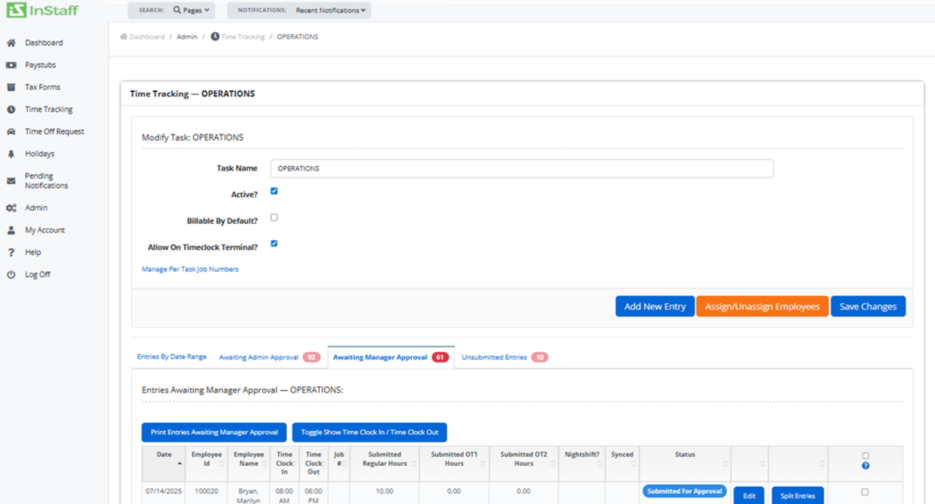
Simplified Approval Workflows
Approval workflows can be configured to match your organization’s needs. Assign managers to specific employees for review, set up multi-step approval processes, or allow admins to submit entries on behalf of team members. You can also control access and permissions to ensure the right people have the ability to view, edit, approve, or reject time entries.

Automatic Manager Assignments
Managers are automatically linked to their respective employees, streamlining the approval process and ensuring efficient oversight.

Customizable Reports
Live Data Manipulation
Autosave Functionality
Time Entry History
Employee Personalization
Sage 300 ERP Integration
LEARN MOREOutput & Integrations
Export your report for the period as PDF or CSV for import into your accounting program. Custom export formatting and integrations availableupon request.
Frequently Asked Questions
How does InStaff help prevent time fraud?
InStaff uses features like GPS location tracking, mobile time clock software, and secure logins to ensure employees clock in only when and where they’re supposed to. This prevents buddy punching, false entries, and other forms of time theft.
Can my team clock in if they are working remotely?
Yes. InStaff’s mobile time tracking software allows employees to clock in and out from anywhere. GPS tracking confirms their location so you know remote teams and field employees are logging accurate hours.
Is InStaff a good time tracking software for field employees?
Absolutely. InStaff is built with field employees in mind. Our mobile time clock works on smartphones, making it easy for staff in construction, delivery, healthcare, and other fieldwork to track time seamlessly.
What happens if an employee forgets to clock in?
Supervisors can adjust time entries with proper notes or approvals. InStaff keeps a clear audit trail of any edits to ensure accurate and transparent payroll records.
Does InStaff integrate with payroll systems?
Yes. InStaff integrates with popular payroll systems, so time data flows directly into payroll, reducing errors and saving time on manual entry.
Can managers track employee hours in real time?
Yes. Managers can view live dashboards showing who is clocked in, where they are, and how many hours they’ve worked. This helps monitor productivity and attendance instantly.
How does mobile time clock software work with InStaff?
Employees log in through the InStaff web portal on their phone/computer browser, clock in with GPS verification, and their hours are instantly recorded in the system. No paper timesheets, no guesswork, just accurate data.
Can InStaff send alerts for missed punches or overtime?
Yes. InStaff can send automatic alerts when an employee forgets to clock in/out or is approaching overtime, helping managers stay on top of labor costs and compliance.